
Cytrus Software

Software that keeps twenty-year-old Macs doing real work. An emulator, an app store, and a browser. All free, all open.

Projects

Three apps, each still in progress. Every section below opens. The last one on each is written for engineers.

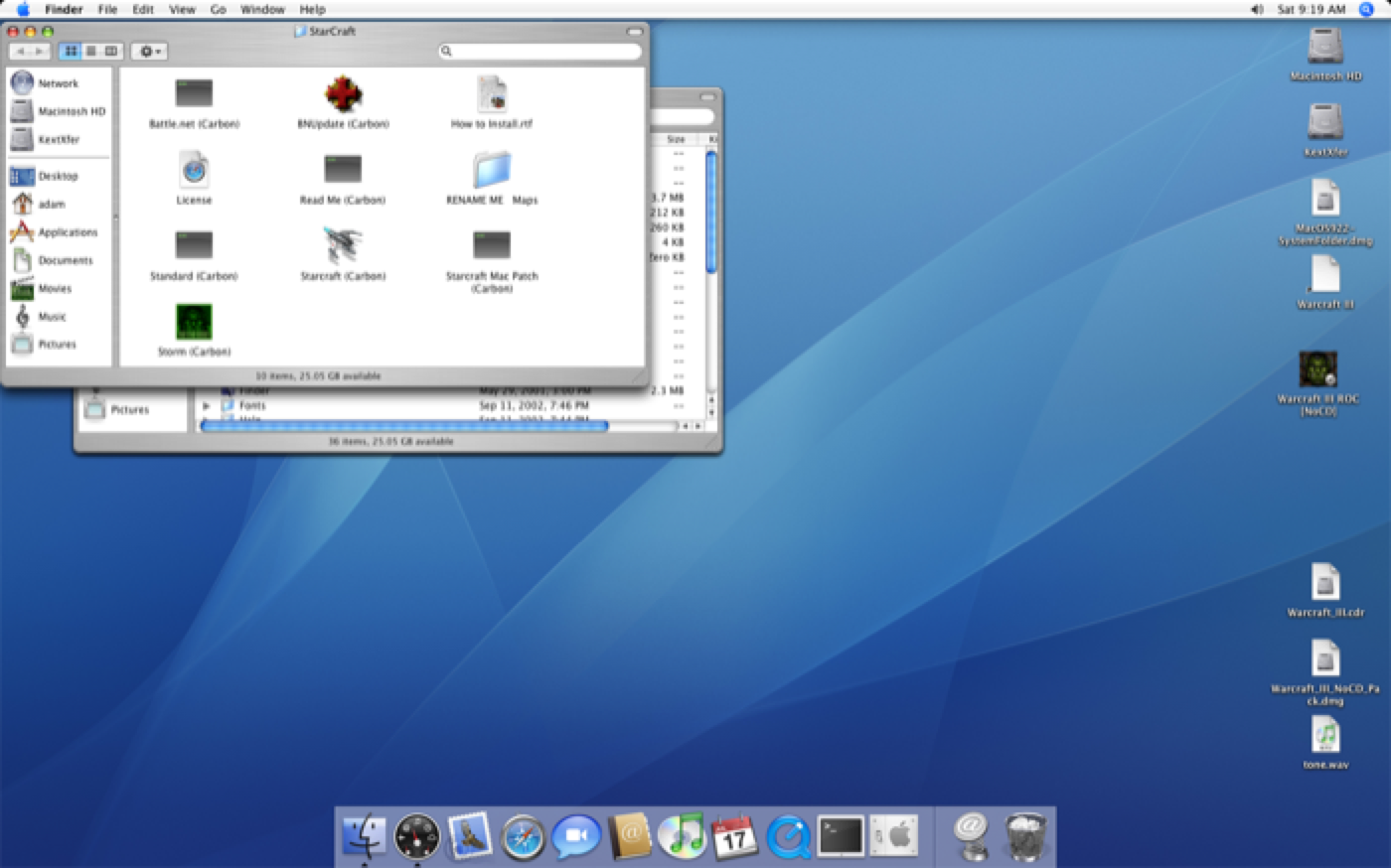
A Mac OS X Tiger desktop with Aqua windows and the Dock, running under PowerEmu
In progress · Apple silicon · Tested on Tiger

PowerEmu

Twenty years of Mac. Running at full speed.

PowerEmu runs Mac OS X Tiger on your Apple silicon Mac. The whole system, exactly as it shipped in 2005 — Finder, Dock, Aqua, Classic. Not a picture of it. The real thing.

Most emulators draw the screen in software. Windows drag, screen savers stutter, and games refuse to start at all. PowerEmu renders through Metal, on the graphics chip already in your Mac. Quartz Extreme switches on. Windows glide. Games play.

Warcraft III runs at 26 frames per second.

What it can do
  • Games that play. 3D runs on your Mac’s graphics chip, so games, screen savers and Chess all work the way they did on the real hardware.
  • Smooth, the way it was meant to be. Quartz Extreme turns on, so windows glide and the transparency and glow come with them.
  • Sound without the stutter. Steady audio, no crackle, no dropouts.
  • Copy here. Paste there. Your clipboard works across both Macs, in both directions.
  • Shared folders. Drop a file in on one side, pick it up on the other.
  • Edge to edge. Full screen on any Mac display, notch included.
  • Always the right time. The clock stays in step with your Mac’s, automatically.
  • Mail that works again. PowerEmu handles the modern security Gmail and iCloud require, so the old Mac’s own Mail app can sign in.
  • A faster web. Same idea, applied to web pages — your Mac does the heavy part.
  • Mac OS 9, too. Classic runs, so the software from before Mac OS X runs with it.
  • A shelf of Macs. Keep as many as you like, each with its own disks and settings, and start whichever one you need.
  • Your drives are its drives. CDs, DVDs, disc images and USB devices, handed straight through.
Why it’s faster than the alternatives

PowerEmu is built on QEMU, the free emulator that already knows how to be an old Mac. On its own, though, it stops well short. Here’s the difference.

Plain QEMUPowerEmu
No real graphics card. The Mac draws every window itself, in software. A graphics card Mac OS X recognizes and drives with its own drivers.
No 3D. Games and screen savers crawl or refuse to start. 3D runs on your Mac’s graphics chip. Games play.
Quartz Extreme stays off. Mac OS X looks for a real graphics card and doesn’t find one. It finds one. The effects switch on and windows move smoothly.
The pointer leaves smudges behind it. Your Mac draws the pointer. It stays clean.
A handful of old screen sizes, none of them the shape of a Mac display. Sizes that match your display, and true full screen.
Audio crackles and cuts out. Audio is steady.
A USB device plugged in at a busy moment can freeze everything. It keeps running.
Click away and macOS quietly slows it down to save battery. Full speed, even in the background.
Default settings that suit old Mac software poorly, so everything runs slower than it needs to. Tuned for it. One benchmark went from about ten seconds to two.
No connection to your Mac. No clipboard, no shared folders, no clock. All three — and a real Shut Down instead of pulling the plug.
A second icon in your Dock, and nothing to manage machines with. One app. A library of Macs, with storage and settings for each.
Technical details

Graphics

  • An emulated ATI Radeon 9000 (RV280/R200)ppc-mac-gpu, with an MMIO register set, a PM4 command processor and ring buffer, a 2D engine (fills, blits, host data, clipping) and AGP/GART address translation. Mac OS X’s own ATI kexts bind to it unmodified.
  • A Metal renderer for the R200 3D pipeline. Draw packets go straight to Metal: hardware T&L (model-view-projection, lighting, spot lights and attenuation, texture matrices, fog), viewport and scissor, R200 texture combiners, alpha test, blending done in-shader through framebuffer fetch, plane masks, depth and stencil. Textures in ARGB8888, RGBA/ABGR8888, RGB565, ARGB1555, ARGB4444, I8, AI88, DXT1/3/5 and YUV 4:2:2, resident in VRAM or fetched over AGP. It renders into VRAM through linear Metal texture views — no shadow copies.
  • Quartz Extreme. The uni-north host bridge gets an AGP capability and a working GART, so Apple’s AppleMacRiscAGP drives the bus, the Radeon driver builds its AGP GART and reports AccelCaps = 1, and WindowServer switches on the OpenGL compositor.
  • A hardware cursor. A patched QEMU VGA NDRV reports cursor support and hands the image and position to the GPU model, which draws it on the host — fixing the stale save-under that left cursor-shaped notches over OpenGL windows.
  • Host-shaped display modes. The device’s EDID (Established Timings III) and the patched NDRV’s mode table add 1440×932, 1280×828, 1152×746 and 1680×1088, plus below-the-notch variants. Full-panel fullscreen covers the whole display including the notch strip.
  • 64, 128 or 256 MB of VRAM, behind a 1 GB uni-north PCI window.

Sound, input and stability

  • Screamer audio pulls DMA at the sample rate from a 1 ms virtual-clock timer into a 186 ms ring; the position register advances with it and a 40 ms jitter buffer fronts the host backend. A four-second 1 kHz capture went from 10–20 dropouts to zero.
  • Seamless pointer via a USB tablet taking absolute positions; captured mode remains for games.
  • OHCI bounds transfer descriptors per endpoint per frame and drops missed frames rather than replaying them, which used to livelock the emulator under host load.

Speed

  • Host scheduling. An NSActivityUserInitiated | LatencyCritical assertion plus QOS_CLASS_USER_INTERACTIVE on the TCG vCPU threads stops App Nap exiling the emulator to the efficiency cores. A guest benchmark loop dropped from 9–11 s to 3.4 s on that change alone.
  • TCG: a raised softmmu TLB floor (1024 entries) and a 64K-entry TB jump cache retired by a generation counter, so a flush stays O(1) — a game covers 100k+ translation blocks and every PowerPC blr is an indirect branch.
  • target/ppc: lmw/stmw expanded inline instead of a helper that probe_accesses the range, and a host-FPU fast path for A-form arithmetic when FPSCR is RN with no enables and no NaNs.
  • GPU batching: conflicting batches ordered on the GPU with shared events rather than waitUntilCompleted on the vCPU thread, hybrid fences, an AGP/GART page-to-host-pointer cache, and draw vertices bump-allocated from a recycled 8 MB buffer.
  • Net result: benchmark loop 9–11 s → 1.95 s. Warcraft III menu 4–5 fps → 26 fps, and 15–40 fps at 1680×1050.

The app and the guest

  • SwiftUI app driving QEMU over QMP. VMs are .poweremu packages; importing disks and ROMs uses APFS clones. The guest screen is drawn inside the app through a poweremu-display object over a Unix socket with shared memory and damage rectangles, so QEMU isn’t a second Dock icon.
  • PowerEmu Tools — a guest agent for 10.4+ PPC, installed per user with no administrator password: clipboard both ways, shutdown and restart through loginwindow (kAEShutDown/kAERestart), and an optional root clock daemon that steps errors over 1 s and slews smaller ones with adjtime.
  • Shared folders over a WebDAV server implementing enough of RFC 4918 for Tiger’s webdavfs, on a per-VM Unix socket so no TCP port is opened.
  • Service Hub: a mail proxy (the guest authenticates locally; PowerEmu does implicit TLS or STARTTLS to iCloud, Gmail, Yahoo or Fastmail with an app password) and a Web Accelerator on 10.0.2.100:7780 doing TLS 1.3 and HTTP/2, WebP/AVIF/HEIC transcoding, image downscaling and 204s for trackers.
  • Built on QEMU 10.0.2 as patched by UTM. GPL-2.0-or-later.

Still in progress. Tested on Tiger; Leopard is untested. Free, and always will be.
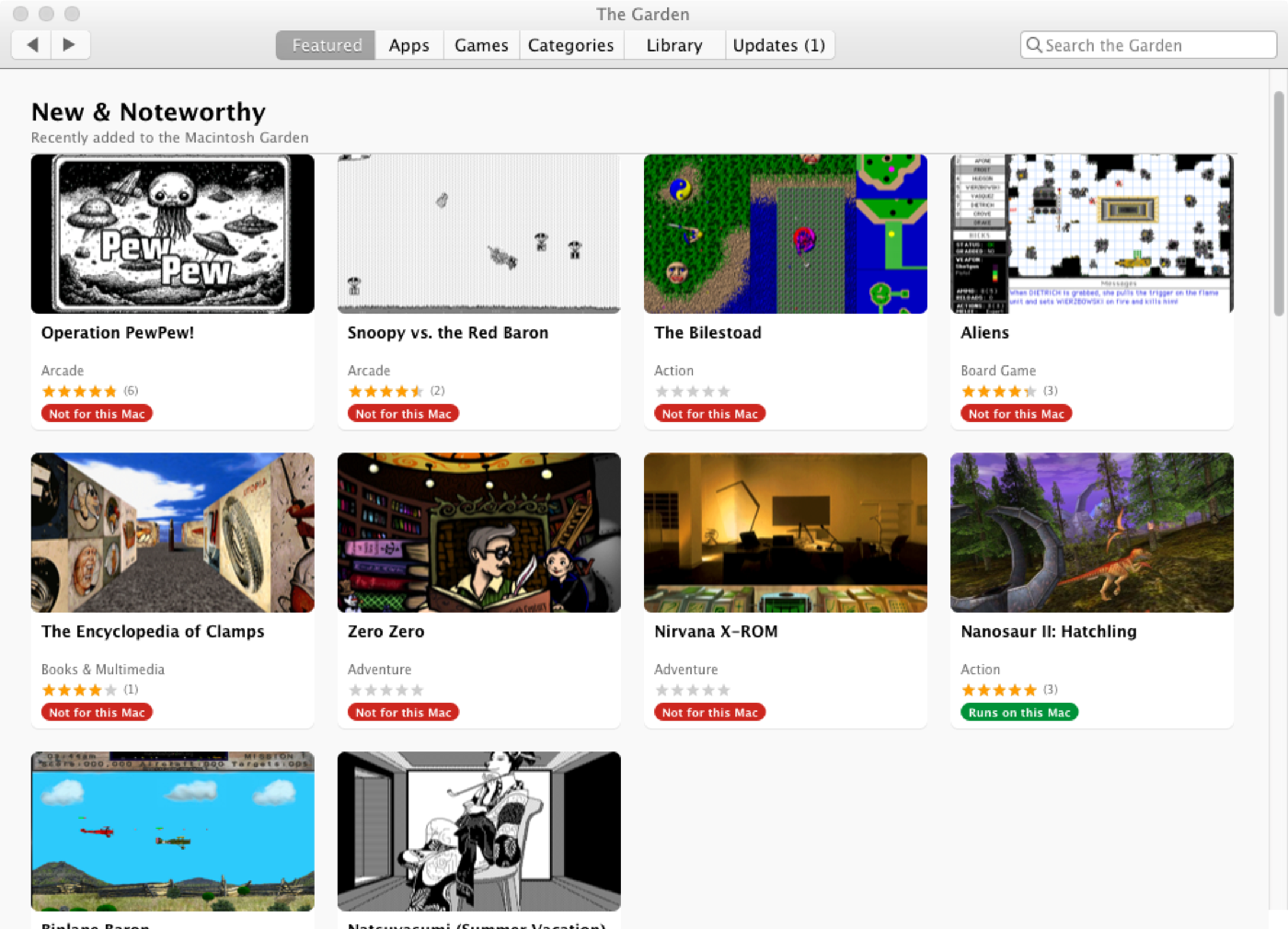
The Garden showing a New & Noteworthy grid of classic Mac software with ratings and compatibility badges
Version 0.1 · Mac OS X 10.4 and 10.5

The Garden

Thousands of classic Mac apps. One button.

The Macintosh Garden has spent years preserving the software that built the Mac. The Garden brings the whole collection to your old Mac, arranged like a store you already know how to use.

Browse. Read the reviews. Press Get. It downloads the file, checks it arrived intact, unpacks whatever format it’s wrapped in, and installs it. Then it’s in your Applications folder, ready to open.

And before you download anything, it tells you whether it runs on your Mac.

What it can do
  • The whole collection, browsable. Featured, Apps, Games, Categories and Search — thousands of titles, sorted and waiting.
  • Know before you download. Every file carries a badge for your Mac: runs natively, runs with help, or won’t run here.
  • Ratings and reviews, pulled from what people have written on the site over the years.
  • One button installs it. Get downloads, verifies, unpacks and puts the app where it belongs. Disk images, StuffIt archives, installer packages — it handles them all.
  • It opens the right thing. Old software arrives as a pile of files. The Garden finds the app and skips the updaters, installers and read-mes.
  • Floppy sets, reassembled. Software that shipped on five disks gets opened and put back together.
  • Your library, with real icons. Everything you’ve installed, ready to open, add to the Dock, or throw away.
  • Updates, handled. It spots newer versions, installs them, and shows the count on the icon.
  • Works offline. Pages you’ve visited stay readable when the connection doesn’t.
  • Kind to the site. It asks only for the pages you open. Nothing is crawled.
  • It reaches a 2026 website from a 2005 Mac, which is harder than it sounds. The technical drawer explains why.
What you need to run it
Mac
Any PowerPC G3 or later, or any Intel Mac. One app runs on both
System
Mac OS X 10.4 Tiger or 10.5 Leopard
Memory
256 MB is plenty. It was built for small machines
Storage
Room for what you install, plus a little for saved pages
Internet
Any connection. Nothing to configure, and no newer Mac needed alongside it
Also works with
Mac OS 9, for the oldest titles. PowerEmu, if you’d rather run all of this on a modern Mac
Price
Free. Open source
Technical details

Reaching the site at all

  • Bundled TLS. Every transfer runs through a statically linked libcurl 8 and OpenSSL 3. Tiger and Leopard’s own TLS stops at 1.0 and can no longer negotiate with the site, so the system stack is bypassed entirely.
  • One thread, one curl multi handle. A thread per request costs too much on a 256 MB G3; a single handle reuses connections, DNS answers and TLS sessions.
  • Persistent page cache with per-request TTLs (item pages 3 days, listings 6 h, the feed 1 h), revalidated with If-None-Match and If-Modified-Since, with offline fallback.
  • PowerEmu Web Accelerator client. Inside a virtual Mac it is found at 10.0.2.100:7780; on a real Mac over Bonjour with a pairing code. Pages and images go through it; downloads, form posts and the search token always go direct, so a file’s MD5 and the session are never in doubt. A Tiger G3 item page: 0.95 s direct, 0.20 s through PowerEmu — the difference is the TLS handshake. Absent, nothing changes.
  • A custom NSURLProtocol puts the system WebKit on the same stack, so a WebView can reach the site on Tiger and shares the app’s cookies.

Store, install and library

  • Featured (New & Noteworthy from rss.xml), Apps and Games A–Z, Categories and Search. Item pages carry screenshots, the rating, reviews parsed from the site’s comments, and rows of More by author and Related.
  • Compatibility badges computed per download against the host: native, Rosetta, Classic, or unsupported.
  • Install pipeline: MD5 verification, disk images via hdiutil, archives through the bundled XADMaster (StuffIt, BinHex, MacBinary, Compact Pro, zip and the rest), applications to /Applications, Mac OS 9 software to Applications (Mac OS 9), packages handed to Installer. Multi-floppy sets, including headerless raw images via CRawDiskImage, are mounted and copied out.
  • Launchable selection prefers the binary whose name matches the title and skips updaters, installers, read-mes and launchers; existing library entries are re-checked at launch.
  • Updates compare version numbers when both file names carry one and upload dates when neither does. The Dock icon is drawn by hand for progress and the badge, since Tiger has no NSDockTile.

Build

  • Universal ppc + i386, deployment target 10.4, built with Apple gcc-4.0 against the 10.4u SDK — Xcode 2.5 on Tiger or 3.1 on Leopard. PowerPC is -mcpu=G3 -mtune=G4; Intel is -march=prescott.
  • MIT licensed. XADMaster and UniversalDetector are the unmodified Universal builds from The Unarchiver 3.11.1, under the LGPL-2.1.

Not run by the Macintosh Garden — just a fond visitor of it.

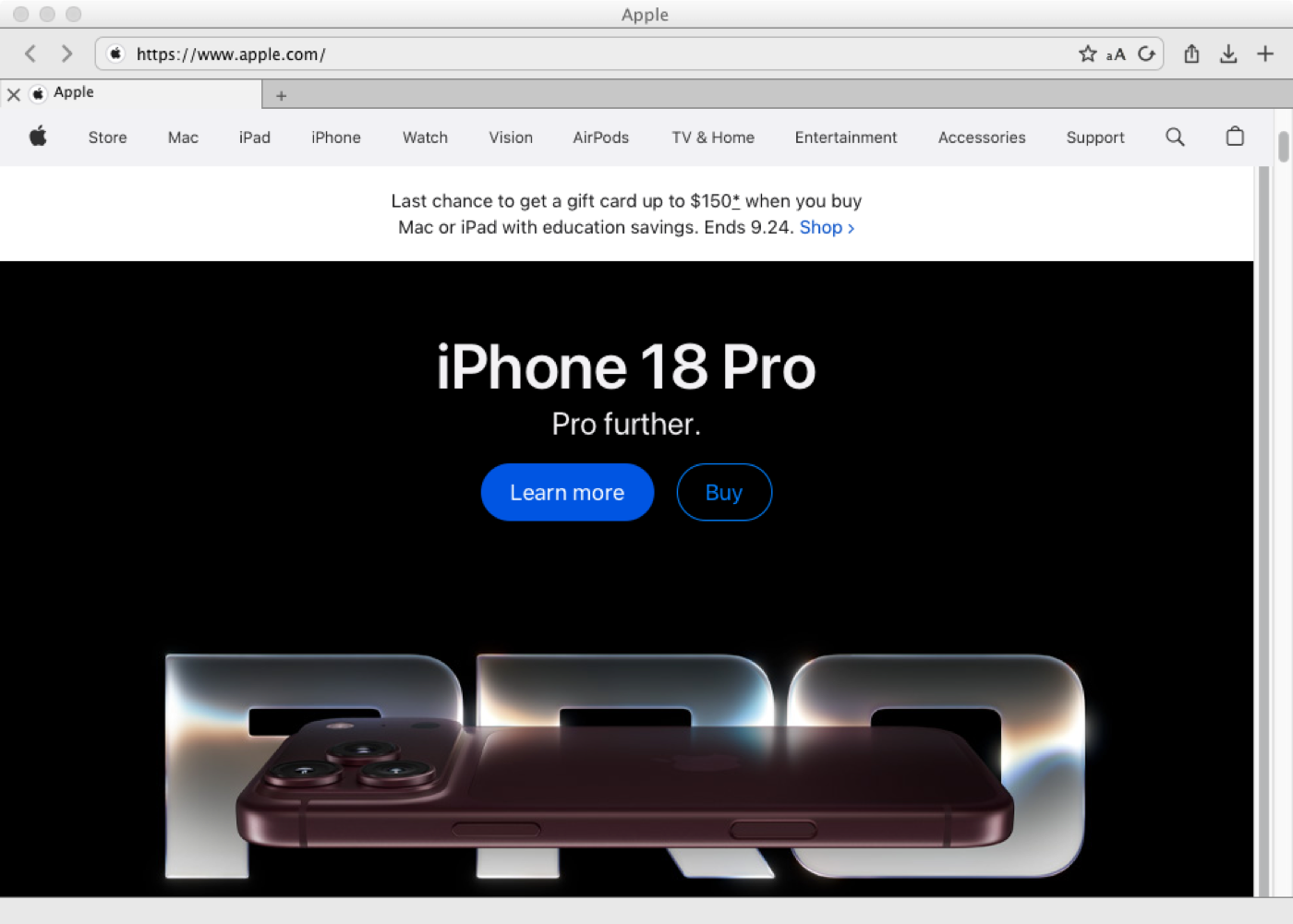
Captain Polliwog on Mac OS X showing the current apple.com home page rendered correctly
Version 0.2, early · Mac OS X 10.4 and 10.5

Captain Polliwog

Your PowerBook. Back on the web.

Old Macs came with a browser. Then the web moved on, and one day the pages stopped loading — an error, a blank screen, or a jumble where the site should be.

Two things had broken. Sites began securing themselves in ways these Macs were never taught, and pages began using features their browser had never heard of. Captain Polliwog replaces both: modern security of its own, and a rendering engine from 2018, rebuilt from source for PowerPC.

Apple.com loads. Wikipedia loads. On a PowerBook.

What it’s like to use
  • A single row of chrome. Buttons, address bar and window controls share one line, the way a Mac browser does today. Nothing wasted.
  • Tabs that know when to rest. Background tabs release their pages when memory runs short and reload the moment you come back.
  • Bookmarks with folders, and it imports the ones already in Safari.
  • Downloads you can pause. Stop, come back, and pick up where you left off.
  • AutoFill. Passwords, addresses and cards, kept in your Mac’s keychain.
  • Private browsing. Nothing kept, nothing cached, cookies cleared when you close it.
  • Reader. The words, without the clutter.
  • A lighter version of a site, on request — sometimes the kinder choice on a slower Mac.
  • YouTube plays.
  • Find on page, printing, saving, and reopening the tab you closed by mistake.
What you need to run it
Mac
Any PowerPC G3 or later, or any Intel Mac. One app runs on both
System
Mac OS X 10.4 Tiger or 10.5 Leopard
Memory
256 MB runs it. The newer engine is happier with more, and a 1 GB machine is noticeably better
Storage
Room for the app, plus a little for the page cache
Internet
Any connection. Security is built in, so nothing needs configuring
Also works with
PowerEmu, if you’d rather run it on a modern Mac
Price
Free. Open source
Technical details

Networking

  • Its own TLS. Every request goes through a bundled OpenSSL 3.5, libcurl 8.22 and zlib. The system stack stops at TLS 1.0 and cannot reach most sites any more.
  • Plain HTTP goes the same way. Tiger and Leopard try a site’s IPv6 address first and wait about fifteen seconds for it to fail on networks without IPv6; libcurl tries both at once.
  • One thread through a single curl multi handle, browser-level connection limits, and a disk cache that lets a repeat visit skip the network entirely.
  • PowerEmu Web Accelerator client, for when it runs inside a virtual Mac.
  • Current Wikipedia and DuckDuckGo load on a 500 MHz PowerBook G3 with 256 MB of RAM, in about 53 MB of memory.

The engine

  • WebKit 604.5.7 — Safari 11, 2018 — built from source for PowerPC. Cross-compiled on an Apple silicon Mac in a Linux VM with a PowerPC toolchain (about 40 minutes from clean) and packaged as frameworks the browser loads, following Leopard WebKit’s structure. Built through WebKit’s CMake Mac port rather than the Xcode projects Apple used.
  • It has to be a fork. Upstream WebKit removed big-endian support on 1 August 2026 (commit 232cebab), so no future WebKit will ever compile for a PowerPC Mac. This one is frozen on a branch with fixes carried back by hand.

Speed

  • A PowerPC baseline JIT for JavaScriptCore — something it has never had. An offlineasm PowerPC backend runs the LLInt as native code, with a new assembler and macro assembler for the JIT, and the big-endian work that goes with it: EncodedJSValue returned tag-first from C but payload-first from JS, tag-first JSValue arguments, call frame payloads at +4, and byte-reversed loads for typed arrays. 1.5–3.5× the interpreter on micro-benchmarks.
  • Layout that doesn’t redo itself. RenderLayer::updateLayerPositions used to walk every layer in the page after every layout. Each RenderElement now carries a four-bit generation number in spare bitfield room, marked up the ancestor chain by anything that moved and expiring on its own as the view advances the generation; the walk skips subtrees that didn’t change. Checked pixel for pixel against a full re-render via CGWindowListCreateImage. TodoMVC-Svelte-Complex-DOM: 3532 ms → 1277 ms.
  • Speedometer 3.1 on a PowerBook G4: 0.259 → 0.345, against PowerFox 26.4’s 0.189. Eighteen of twenty suites now beat PowerFox; the two left are Charts-chartjs (Core Graphics path rasterization) and TodoMVC-ES5 (relayout boundaries).

What it supports

  • Platform: flexbox and grid with gap, :has(), :focus-visible, unprefixed position: sticky, cascade layers, range media queries, :is()/:where(), logical properties, constructable style sheets; ES2017+ — classes and private members, async/await, generators and async generators, modules and import maps, BigInt; fetch, Web Timing, WebGL through ANGLE, WOFF2 via OTS, and full ICU with all 683 locales.
  • The browser’s own code is under the MPL 2.0.

Early days — rough in places.

About

Cytrus Software is one person making small, honest software with a taste for the old ways — hand-built tools in the spirit of the early web. Quiet, durable, and a little bit strange.

No trackers, no newsletters, no upsells. Just software that does a thing and then gets out of the way.

If you want to say hello, you can reach me at [email protected].

Support

Free. All of it. Nothing to unlock, nothing to subscribe to, nothing tracking you.

If something here earns a place on your Mac, a coffee is a kind way to say so. Any amount, or none — both are genuinely fine.

A note telling me you used something is worth just as much.